Best monitor under 300 shopping unlocks a real step up: 1440p sharpness and higher refresh rates come into reach. The best monitor under 300 lets you choose a bigger, sharper or faster screen than the budget tier, so this roundup ranks seven that make the most of the bracket.
As an Amazon Associate we earn from qualifying purchases.
Our top picks
 Sceptre New 22-Inch Gaming Monitor
- Aspect Ratio: 16:9
- Screen Finish: Matte
- Contrast Ratio: 2000:1
Up to 144Hz refresh rate smooths fast-motion gaming
Built-in speakers skip the need for external ones
Blue-Light Shift technology eases long-session eye strain
22-inch size may feel small for multitasking setups
Resolution caps at 1080p despite the high refresh rate


 Philips 24 Inch Computer Monitor FHD 100Hz
- Aspect Ratio: 16:9
- Screen Finish: Glossy
- Contrast Ratio: 3000:1
VA panel delivers deep blacks and 3000:1 contrast
178-degree viewing angle keeps colors consistent off-axis
Backed by a 4-year advance replacement warranty
Peak brightness is rated at 250, a modest level
Only one HDMI and one VGA port are available


As an Amazon Associate we earn from qualifying purchases at no extra cost to you.
By Daniel Foster
Top Screens in the Sub-$300 Bracket
These seven screens tend to sit around or below the $300 mark, though prices change constantly, so always check the live Amazon listing. Each entry names an honest trade-off, since even here you choose between resolution, refresh and size rather than getting all three.
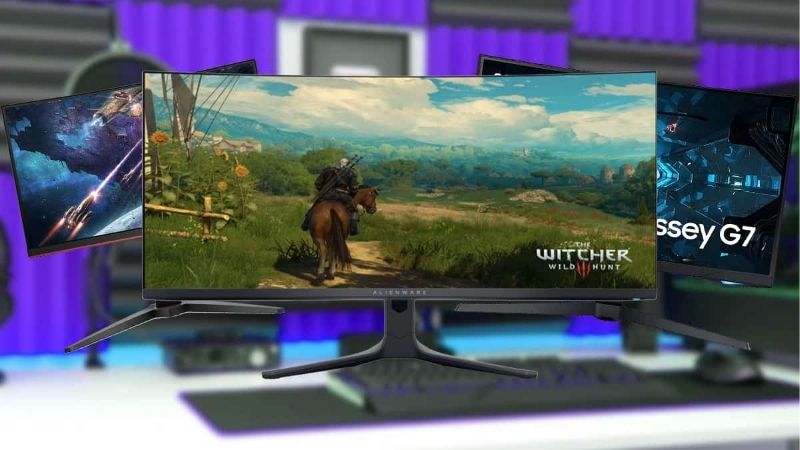
| Model | Size / Res | Panel / Refresh | Best for |
|---|---|---|---|
| Gigabyte M27Q | 27″ / 1440p | IPS / 170Hz | Value all-round |
| LG 27GP750 | 27″ / 1080p | Fast IPS / 240Hz | Competitive gaming |
| Dell G2724D | 27″ / 1440p | IPS / 165Hz | Brand-backed gaming |
| ASUS TUF VG27AQ | 27″ / 1440p | IPS / 165Hz | Well-rounded gaming |
| AOC Q27G3XMN | 27″ / 1440p | VA mini-LED / 180Hz | Contrast + HDR |
| KTC 27″ 1440p | 27″ / 1440p | Fast IPS / 165Hz | Cheapest 1440p |
| Gigabyte M28U (on sale) | 28″ / 4K | IPS / 144Hz | Budget 4K |
Gigabyte M27Q
The M27Q is a benchmark best monitor under 300, a 27-inch 1440p IPS panel at 170Hz with a built-in KVM. It combines the sharpness of 1440p with gaming-grade refresh and a genuinely useful feature, making it a standout value all-rounder for work and play.
Its unconventional subpixel layout can slightly soften text on some setups, and the stand is basic. For a screen that games smoothly and works sharply at a price that regularly fits this bracket, though, it is one of the most recommended panels available.
LG 27GP750
The 27GP750 is a competitive gaming pick, a 27-inch 1080p fast IPS panel at 240Hz. It trades resolution for speed, delivering very high frame rates and quick response for esports players who want top-tier smoothness inside the sub-$300 bracket.
At 1080p on 27 inches, text and detail are softer than a 1440p panel of the same size. For competitive players who prioritize refresh rate and response over sharpness, though, it packs premium speed into an accessible price.
Dell G2724D
The G2724D is a brand-backed 27-inch 1440p IPS gaming panel at 165Hz, pairing sharp resolution with fast refresh and Dell’s build and support. That reliability and after-sales reassurance make it a safe choice for buyers who value a known name in the bracket.
Its stand and extras are functional rather than premium, and contrast is standard IPS. For a dependable, well-rounded 1440p gaming screen from a major brand at a competitive price, though, it is an easy and low-risk recommendation.
ASUS TUF VG27AQ
The TUF VG27AQ is a well-rounded 27-inch 1440p IPS panel at 165Hz with strong motion handling and adaptive sync. It is a long-standing favorite in this bracket, balancing sharpness, speed and reliable performance for both gaming and general use.
It is a standard IPS panel, so contrast trails VA or OLED, and it lacks premium extras. For a proven, balanced 1440p gaming screen that does everything well without a weak spot, though, it remains a consistently recommended pick.
AOC Q27G3XMN
The Q27G3XMN is a standout for contrast, a 27-inch 1440p VA mini-LED panel at 180Hz with real local dimming. That combination delivers deep blacks and genuine HDR impact rarely seen at this price, making it a bargain for media and immersive gaming.
VA response can smear slightly in dark transitions and viewing angles are narrower than IPS. For a buyer who wants standout contrast and HDR punch inside the sub-$300 bracket, though, it offers a feature set that usually costs far more.
KTC 27″ 1440p
KTC’s 27-inch 1440p fast IPS panel at 165Hz is among the cheapest ways into 1440p gaming, often sitting well under the ceiling. It delivers sharp resolution and high refresh at a price that undercuts name-brand rivals, stretching the budget noticeably further.
Build quality and support are more basic than established brands, which is the trade for the low price. For a value hunter who wants 1440p and high refresh for the least money, though, it is a compelling way to enter the sharper resolution tier.
Gigabyte M28U (on sale)
The M28U is a 28-inch 4K IPS panel at 144Hz with HDMI 2.1, and on sale it can slip into the sub-$300 bracket. When it does, it is a remarkable budget 4K pick, offering ultra-sharp detail and console-ready connectivity well below its usual price.
Driving 4K at high refresh needs a strong GPU, and it only fits this bracket during discounts. For a buyer who catches it on sale and has the hardware to feed it, though, it delivers 4K sharpness that normally costs considerably more.
How to Choose the Best Monitor Under 300
The right screen in this bracket lets you pick a real strength, whether sharpness, speed or size, without overpaying. Work through the criteria below, starting with the numbers that matter, so your best monitor under 300 fits your use rather than just the price ceiling.
The decision numbers: size, resolution, panel and refresh
This bracket opens up 1440p, so decide whether resolution or refresh leads. A 27-inch 1440p panel at 165 to 170Hz is the versatile sweet spot, while pure competitive gamers may prefer 1080p at 240Hz, and bargain hunters can even catch 4K on sale.
Weigh panel type for your use. IPS suits sharp, well-rounded 1440p gaming and work, VA mini-LED adds standout contrast and HDR for media, and each choice trades something, so match the panel to whether color, contrast or speed matters most to you.
Prices move constantly, so treat the $300 figure as a moving ceiling. Focus on the resolution, panel and refresh that suit your use, and verify the live price at the moment you buy, since sales regularly bring higher-tier screens into this bracket.
Space and fit: sizing to your desk
27 inches is the natural size in this bracket, sharp at 1440p and comfortable on most desks. Measure your desk depth to sit at a good distance, and if you consider a 28-inch 4K panel on sale, confirm you have both the room and the GPU for it.
Check the stand, since even mid-value screens can skimp on adjustment. If height and tilt are limited, a monitor arm sets the top of the screen near eye level and frees desk space, which improves comfort over long sessions of work or gaming.
Where the sub-$300 bracket shines
This bracket shines for buyers who want 1440p sharpness or high-refresh gaming without premium prices. It is the sweet spot where a single screen can handle sharp work, smooth gaming and good color, covering most users’ needs without stepping into flagship costs.
If you need wide-gamut creative accuracy, true HDR mastering or an OLED panel, you will still need to spend more. But for the vast majority of gamers and general users, the sub-$300 bracket delivers the best balance of quality and price on the market.
Value and timing
Timing can lift you a whole tier here. Screens drop around Prime Day in late June, Black Friday in November and the back-to-school window, so patience can bring a 1440p high-refresh or even a 4K panel comfortably inside the budget for the same spend.
Compare the full package rather than price alone. A screen with a KVM, adaptive sync and a usable stand can be better value than a bare panel, so weigh the features and build before choosing the best monitor under 300 on sticker price by itself.
Frequently Asked Questions
Here are quick answers to the questions buyers ask most in this bracket, so you can choose with confidence.
Can you get 1440p under $300?
Yes, and it is the highlight of this bracket. A 27-inch 1440p IPS panel at 165 to 170Hz regularly fits the budget, giving sharp resolution and gaming-grade refresh together. That combination is the main reason to step up from the sub-$200 tier.
Is 1440p or 1080p 240Hz better here?
It depends on your priority. 1440p at 165Hz gives sharper, more versatile use for work and gaming, while 1080p at 240Hz maximizes competitive smoothness. Choose 1440p for all-round quality and 1080p high-refresh if you play fast esports titles above all.
Can I get 4K in this bracket?
Sometimes, on sale. Panels like the 28-inch Gigabyte M28U can slip under $300 during discounts, offering budget 4K. You need a strong GPU to drive 4K well, though, so it suits buyers who catch a deal and have the hardware to match.
Is a mini-LED VA panel worth it?
For contrast and HDR, yes. A 1440p VA mini-LED panel offers deep blacks and real HDR impact rarely seen at this price. The trade is VA’s slower dark response and narrower angles, so it suits media and immersive gaming more than competitive play.
See More:
- Best eyeshadow blender brush
- Best frozen foods for air fryer
- Best frozen food for air fryer
- Best way to reheat steak in air fryer
- Best air fryer recipes book
Final Thoughts on the Best Monitor Under 300
The best monitor under 300 lets you choose a genuine strength, whether 1440p sharpness, 240Hz speed or standout contrast, without paying flagship prices. Favor a 27-inch 1440p high-refresh IPS panel for versatile use, match any 4K sale pick to your GPU, and add an arm if the stand is basic. Match the screen to your priority, time the buy around a sale, and the best monitor under 300 will feel like a real upgrade for years.