Laptop stand review roundups should focus on what matters for your neck: how high it raises the screen, how stable it is and whether it fits your laptop. This laptop stand review ranks seven picks by adjustability, stability and portability, so you can sit up straighter every day.
As an Amazon Associate we earn from qualifying purchases.
Our top picks


As an Amazon Associate we earn from qualifying purchases at no extra cost to you.
By Daniel Foster
Top Laptop Stands Compared
These seven stands span ultra-portable folding models to sturdy adjustable desk risers. Each entry names an honest trade-off, since portability, adjustability and stability rarely all align. Amazon pricing shifts often, so confirm the live listing before choosing any model below.

| Model | Type | Adjustability | Standout | Best for |
|---|---|---|---|---|
| Rain Design mStand | Fixed aluminum | Fixed height | Rock-solid stability | Clean desks |
| Twelve South Curve Flex | Adjustable | Height + angle | Ergonomic range | Flexible setups |
| Nulaxy C1 | Adjustable | Height + angle | Value adjustable | Budget ergonomics |
| BoYata N21 | Heavy adjustable | Wide range | Stability + range | Large laptops |
| Roost Stand | Folding portable | Height adjust | Very compact | Travel |
| MOFT Laptop Stand | Adhesive folding | Two angles | Ultra-thin | Ultraportable |
| UGREEN Foldable | Folding | Multi-angle | Value portable | Everyday carry |
Rain Design mStand
The mStand is a design classic in any laptop stand review, a single-piece aluminum stand that raises the screen to a fixed, ergonomic height with rock-solid stability. Its clean look and cable slot suit a tidy desk, and it never wobbles under a typing hand.
Its height and angle are fixed, so it does not adjust to different users, and it is not portable. For a permanent desk setup where stability and a clean design matter more than flexibility, though, it is a longstanding favorite that lasts for years.
Twelve South Curve Flex
The Curve Flex offers a wide range of height and angle adjustment in a sturdy, foldable aluminum frame. That flexibility lets you dial in the exact screen height for your posture and even fold it down for travel, blending ergonomics with portability.
It is a premium stand and heavier than ultralight travel models. For a user who wants adjustable ergonomics on a main desk with the option to pack it away occasionally, though, it is one of the most versatile stands available.
Nulaxy C1
The Nulaxy C1 is a value adjustable stand, offering height and angle changes in a stable metal frame at a budget-friendly price. It brings proper ergonomic adjustment within reach for those who do not want to spend heavily on a premium brand.
Its finish and refinement trail premium stands, matching the price. For a home-office user who wants adjustable height to reach eye level without a large outlay, though, it delivers the core ergonomic benefit affordably and stably.
BoYata N21
The BoYata N21 is a heavy, highly adjustable stand built for stability across a wide range of heights and angles, comfortably holding larger and heavier laptops. Its sturdy hinges stay put once set, supporting big machines without sag or wobble.
Its weight makes it a desk fixture rather than a travel stand, and it takes force to adjust. For a user with a large laptop who wants a wide, stable adjustment range on a fixed desk, though, it is an excellent, dependable choice.
Roost Stand
The Roost is a favorite among travelers, folding down to a slim, lightweight bundle while raising the screen to eye level when deployed. Despite its minimal weight, it holds a laptop securely, making it ideal for a mobile ergonomic setup on the road.
It is a premium price for a travel stand and less stable than a heavy desk model under vigorous typing. For a frequent traveler who wants eye-level ergonomics in a genuinely packable form, though, it is one of the best portable stands made.
MOFT Laptop Stand
The MOFT is an ultra-thin adhesive stand that sticks to the base of your laptop, adding a slight lift at two angles while barely adding thickness. It is always with your laptop, offering a quick posture boost without carrying a separate accessory.
It raises the screen far less than a full stand, so it is a modest ergonomic aid rather than a full eye-level solution, and adhesive stands are permanent. For someone who wants the lightest possible always-on lift, though, it is uniquely convenient.
UGREEN Foldable
The UGREEN Foldable is a value everyday-carry stand, folding flat for a bag while offering several angle settings on the desk. It balances portability and adjustability at a low price, suiting users who move between locations and want a stand in every one.
Its stability and lift trail heavier desk stands, matching its portable design. For a hybrid worker who wants an affordable, packable stand for both home and office desks, though, it is a practical and flexible option.
How to Choose a Laptop Stand
The right stand raises your screen to a comfortable height, holds your laptop securely and fits how you work. Work through the criteria below, starting with the factors that define ergonomics, so your laptop stand review leads to a stand that genuinely improves posture.
The decision numbers: height, adjustability and stability
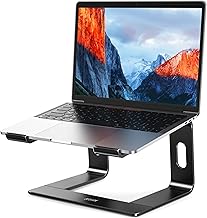
The core of any laptop stand review is height, adjustability and stability. The stand should raise the screen so its top sits near eye level, adjust to suit your desk and chair, and stay stable as you type, since a wobbly stand undermines the benefit.
Weigh fixed versus adjustable designs. A fixed stand is simplest and very stable but suits one height, while an adjustable stand fits multiple users and postures, so choose based on whether one person uses it at one desk or several people share it.
Check the weight capacity and laptop size. Larger laptops need a sturdier stand with a wider range, so confirm the stand supports your machine’s size and weight, since a stand that sags or tips with a big laptop is worse than none at all.
Space and fit: desk setup and external input
Remember that raising the laptop means you need an external keyboard and mouse. At eye level, the built-in keyboard sits too high to type comfortably, so plan for external input, which is the trade-off that makes a stand ergonomically worthwhile.
Match the stand’s footprint to your desk. Some stands have a wide base for stability while others are compact, so factor in the space it occupies and whether it leaves room for your keyboard, mouse and any documents you use alongside the laptop.
Consider cable management and airflow. A stand that lifts the laptop improves ventilation and often routes cables cleanly, so if heat or clutter is a concern, look for a design with an open frame and a cable slot to keep the desk tidy.
Portability versus stability
Decide whether the stand stays put or travels. Heavy adjustable stands are the most stable and support large laptops but are desk fixtures, while folding and adhesive stands prioritize portability at some cost to stability, so match the type to how you work.
For hybrid or travel use, a folding stand that packs flat is invaluable, letting you keep good posture anywhere. For a fixed home desk, a sturdy stand you never move is better, so let your work pattern decide which side of the trade to favor.
Comfort, value and timing
A laptop stand supports better posture but is not a cure for pain. Raising the screen to eye level reduces neck strain for many people, yet it works best with an external keyboard and good chair setup, so treat it as one part of a healthy workspace.
Timing helps the budget. Laptop stands drop around Prime Day in late June, Black Friday in November and the back-to-school window, so a little patience can move you into a premium adjustable or travel stand for the same overall spend.
Frequently Asked Questions
Here are quick answers to the questions buyers ask most about laptop stands, so you can choose with confidence.
Do I need an external keyboard with a stand?
Yes, for the ergonomic benefit. Raising the laptop to eye level puts the built-in keyboard too high to type comfortably, so you need an external keyboard and mouse. That combination is what lets a stand actually improve your posture rather than just your view.
Fixed or adjustable stand?
A fixed stand is simple and very stable but suits one height, while an adjustable stand fits different users and postures. Choose fixed for a solo permanent desk where stability matters most, and adjustable if several people share it or you want to fine-tune height.
Are portable stands stable enough?
Folding travel stands are stable enough for normal typing but less rock-solid than heavy desk models. For a fixed desk, a sturdier stand is better, while for travel a packable stand is worth the small trade in stability for the eye-level posture it provides.
Will a stand help my neck?
Raising the screen to eye level reduces the downward tilt that strains the neck, which helps many people. It supports better posture rather than treating any condition, so pair it with an external keyboard and good chair, and see a professional for ongoing pain.
See More:
- Best eyeshadow blender brush
- Best frozen foods for air fryer
- Best frozen food for air fryer
- Best way to reheat steak in air fryer
- Best air fryer recipes book
Final Thoughts on This Laptop Stand Review
The best pick from this laptop stand review is the one whose height, adjustability and stability suit your desk, your laptop and your posture. Choose a sturdy fixed or adjustable stand for a home desk or a folding one for travel, and pair it with an external keyboard to gain the real ergonomic benefit. Match it to how you work, time the buy around a major sale, and this laptop stand review will help you sit up straighter every day.