Key takeaways
What's inside
Monitor refresh rate explained simply: it is how many times per second the screen redraws, measured in Hz. Getting monitor refresh rate explained clearly helps you avoid overpaying for speed you cannot use, so this guide covers what Hz means, how response time and sync fit in, and how much you need.
As an Amazon Associate we earn from qualifying purchases.
As an Amazon Associate we earn from qualifying purchases at no extra cost to you. Product prices and availability are accurate as of the date shown and are subject to change.


By Daniel Foster
What Refresh Rate Actually Means
Refresh rate is one of the most misunderstood monitor specs, often confused with response time or frame rate. Understanding what it does, and what it does not, is the key to buying the right screen instead of paying for a headline number your setup cannot benefit from.
| Refresh rate | Feels like | Best for |
|---|---|---|
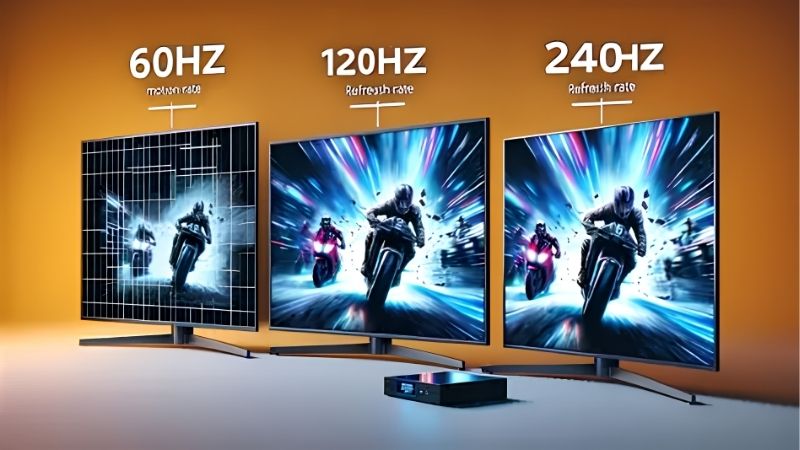
| 60Hz | Standard, smooth enough | Office, creative, casual |
| 120-144Hz | Noticeably smoother | Most gaming, mixed use |
| 240Hz | Very fluid motion | Competitive gaming |
| 360Hz+ | Marginal gains | Esports pros |
The decision numbers: Hz, response time and sync
With monitor refresh rate explained, three numbers matter together. Refresh rate in Hz is how often the screen redraws, response time in milliseconds is how fast pixels change color, and adaptive sync keeps the two aligned with your GPU to prevent tearing.
A high refresh rate needs a low response time to shine, or fast motion smears despite the high Hz. Look for both a high refresh figure and a genuinely fast response, since a 240Hz panel with sluggish pixels will not feel as clean as the number suggests.
Adaptive sync, whether FreeSync or G-Sync compatible, matches the screen’s refresh to your frame rate. This eliminates tearing and stutter when your GPU cannot hold a steady rate, so treat it as a near-essential feature on any gaming screen you consider.
Refresh rate versus frame rate
Refresh rate and frame rate are related but not the same, and confusing them wastes money. Refresh rate is the screen’s maximum redraws per second, while frame rate is how many frames your GPU actually produces, and you only benefit when the two roughly match.
A 144Hz screen shows no advantage if your graphics card only pushes 60 frames per second in your games. That is why matching the panel to your GPU matters more than the headline Hz, and why a modest gamer gains little from a very high refresh rate.
The reverse is also true: a powerful GPU pushing high frame rates is wasted on a 60Hz screen that cannot display them. Balancing the two is the practical heart of getting monitor refresh rate explained in a way that guides a smart, cost-effective purchase.
Space and fit: refresh across sizes and uses
Refresh rate interacts with resolution and size. High refresh at 4K is very demanding on a GPU, so many gamers pick 1440p for a better balance of sharpness and frame rate, while a smaller 24-inch panel makes very high refresh easier to drive for esports.
Consider your desk and seating too. Competitive players often sit close to a 24 or 27-inch high-refresh screen for fast reactions, while a productivity user at a deeper desk gains nothing from high Hz, so match refresh to both your games and your setup.
Motion clarity, overdrive and blur
Refresh rate is only part of motion clarity, which is why monitor refresh rate explained also covers overdrive and blur reduction. Overdrive speeds up pixel transitions to reduce smearing, but pushing it too hard causes overshoot artifacts, so a balanced setting usually looks cleanest.
Some panels add backlight strobing to sharpen motion further, though it lowers brightness and can flicker. These extras help most in fast games, so weigh them alongside raw refresh rather than assuming the highest Hz alone guarantees the clearest possible motion.
The takeaway is that a good panel pairs a sensible refresh rate with a fast, well-tuned response and optional clarity features. Balancing those beats chasing the biggest Hz number, which is the practical heart of choosing a screen for smooth, sharp motion.
How Much Refresh Rate You Really Need
The right refresh rate depends entirely on what you do and what your hardware can drive. This section turns the theory of monitor refresh rate explained into a practical recommendation for each type of user, from office work to competitive gaming.
For office and creative work
For documents, browsing and design, 60Hz is smooth and completely sufficient. Office and creative tasks do not benefit from higher refresh, so paying for a gaming-grade panel here wastes money that would be better spent on resolution or color accuracy.
If you occasionally game casually, a 100 to 120Hz panel adds a little smoothness without a big premium. But for pure productivity and creative work, prioritize an accurate IPS panel at 60Hz and put your budget toward the specs that actually improve those tasks.
For mainstream and competitive gaming
Most gamers hit the sweet spot at 120 to 144Hz, a clear, noticeable step up from 60Hz that mid-range graphics cards can drive at 1440p. This range suits the majority of players and games, balancing smoothness against GPU demand and cost effectively.
Competitive esports players benefit from 240Hz, but only with a GPU that pushes frame rates near that figure. Beyond 240Hz, gains become marginal and matter mainly to professionals, so most players are better served spending on resolution or panel quality instead.
Matching refresh rate to your GPU
The single most important rule is to match refresh rate to your graphics card. A high-Hz screen only delivers if your frame rate approaches it, so check what your GPU produces in your games before choosing a panel, rather than buying the biggest number available.
If your card is modest, a 144Hz 1080p or 1440p panel is a better buy than a 240Hz screen you cannot feed. If your card is powerful, a higher refresh unlocks its potential, so let the hardware you own guide the refresh rate you pay for.
Remember that adaptive sync smooths the experience when frame rates fluctuate below the refresh ceiling. Pairing a sensible refresh rate with FreeSync or G-Sync compatibility gives cleaner motion than chasing raw Hz alone, which is the real takeaway of this guide.
Frequently Asked Questions
Here are quick answers to the questions readers ask most about refresh rate, so you can choose with confidence.
Is 144Hz enough for gaming?
For most gamers, yes. 144Hz is a clear, noticeable upgrade over 60Hz and is easy for mid-range graphics cards to drive at 1440p. Only competitive esports players see meaningful benefit from stepping up to 240Hz, so 144Hz is the practical sweet spot.
Does refresh rate matter for office work?
Not much. Documents, email and browsing feel smooth at 60Hz, so a high refresh rate adds cost without a benefit you will notice. Office users should put that budget toward resolution, color accuracy or ergonomics instead, which improve daily work far more.
What is the difference between refresh rate and response time?
Refresh rate is how many times per second the screen redraws, in Hz, while response time is how fast individual pixels change color, in milliseconds. Both matter for motion clarity, so a high refresh rate needs a low response time to actually look clean.
Do I need adaptive sync?
For gaming, it is close to essential. FreeSync or G-Sync compatibility matches the screen’s refresh to your GPU’s frame rate, eliminating tearing and stutter when the rate fluctuates. It costs little on modern panels and noticeably improves the feel of fast motion.
See More:
- Best eyeshadow blender brush
- Best frozen foods for air fryer
- Best frozen food for air fryer
- Best way to reheat steak in air fryer
- Best air fryer recipes book
Final Thoughts on Monitor Refresh Rate Explained
With monitor refresh rate explained, the key is balance: match Hz to your graphics card, pair a high refresh with a fast response time, and add adaptive sync for clean motion. Office and creative users gain nothing beyond 60Hz, most gamers thrive at 144Hz, and only competitive players need 240Hz or more. Buy for how you play and what your GPU can drive, and you will get smooth motion without paying for speed you cannot use.