Key takeaways
- USB docking station shopping comes down to ports, power delivery and how many displays it can drive. The right USB docking station turns one laptop cable into a full desk of monitors, peripherals and power, so this roundup ranks seven…
What's inside
USB docking station shopping comes down to ports, power delivery and how many displays it can drive. The right USB docking station turns one laptop cable into a full desk of monitors, peripherals and power, so this roundup ranks seven picks by the specs that decide what your setup can do.
As an Amazon Associate we earn from qualifying purchases.
By Daniel Foster
Top Docking Stations Compared
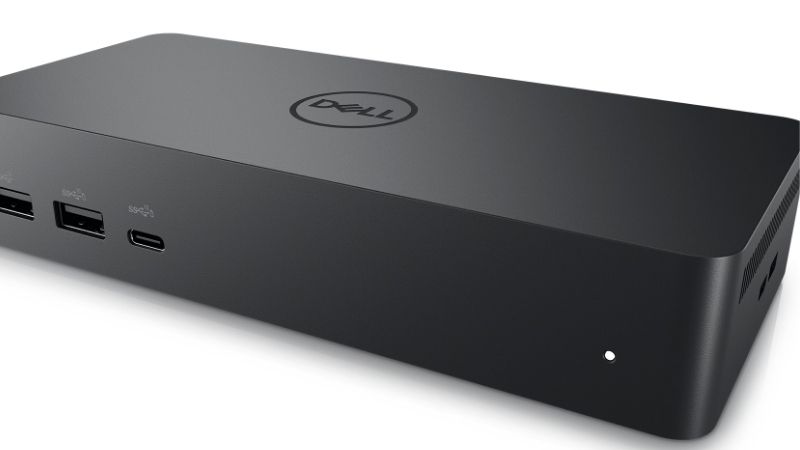
These seven docks span value USB-C hubs to premium Thunderbolt 4 stations. Each entry names an honest trade-off, since port count, display support and price scale together. Amazon pricing shifts often, so confirm the live listing before choosing any model below.
| Model | Interface | Power delivery | Displays | Best for |
|---|---|---|---|---|
| CalDigit TS4 | Thunderbolt 4 | Up to 98W | Dual (2 TB) | Maximum ports |
| Dell WD22TB4 | Thunderbolt 4 | Up to ~90W | Dual/triple | Dell laptops |
| Kensington SD5700T | Thunderbolt 4 | Up to 90W | Dual 4K | Business |
| Anker 575 USB-C Dock | USB-C | Up to ~85W | Dual (varies) | Value all-round |
| Plugable TBT4-UDZ | Thunderbolt 4 | Up to 96W | Dual 4K | Feature-rich |
| UGREEN Revodok Pro | USB-C | Up to ~85W | Dual (varies) | Budget value |
| Belkin Connect TB4 | Thunderbolt 4 | Up to 90W | Dual 4K | Clean design |
CalDigit TS4
The TS4 is a benchmark USB docking station for port count, cramming a huge array of USB, Ethernet, audio and card slots into one Thunderbolt 4 unit. With up to 98W power delivery and dual Thunderbolt outputs, it drives demanding multi-monitor, multi-device desks.
It is a premium purchase and needs a Thunderbolt host to unlock its full potential. For a power user who wants the most connectivity from a single cable and has a compatible laptop, though, it is one of the most capable docks available.
Dell WD22TB4
The WD22TB4 is a Thunderbolt 4 dock tuned for Dell laptops, offering strong power delivery and dual or triple display support depending on your machine. Its tight integration with Dell systems makes it a reliable, well-supported choice for those ecosystems.
It works best with compatible Dell laptops, and display output varies by host. For a Dell user who wants a dependable, well-matched dock with robust power and multi-monitor support, though, it is a natural and trouble-free pairing.
Kensington SD5700T
The SD5700T is a business-focused Thunderbolt 4 dock with dual 4K display support, 90W charging and a solid, secure design. Its reliability and enterprise features make it a common choice for corporate desks that need consistent, manageable connectivity.
It is a premium dock aimed at professional use rather than bargain hunters. For a business or home-office user who values reliable dual-4K output and steady power over the lowest price, though, it is a dependable, well-built option.
Anker 575 USB-C Dock
The Anker 575 is a value all-rounder, a USB-C dock with a good spread of ports and around 85W power delivery at a friendlier price than Thunderbolt stations. It suits laptops without Thunderbolt, delivering solid everyday connectivity for less.
As a USB-C rather than Thunderbolt dock, its display support depends on your laptop’s capabilities and may be more limited. For a mainstream user who wants a tidy, affordable one-cable desk without needing Thunderbolt, though, it is a smart pick.
Plugable TBT4-UDZ
The Plugable TBT4-UDZ is a feature-rich Thunderbolt 4 dock with dual 4K support, 96W charging and an unusually generous port selection, including handy front-facing connections. It targets users who want maximum flexibility from a single Thunderbolt cable.
It is a premium dock that needs a Thunderbolt host for full function. For a user who wants extensive ports and reliable dual-display output with strong charging, though, it competes closely with the best stations in this roundup.
UGREEN Revodok Pro
The Revodok Pro is a budget-friendly USB-C dock that packs a useful range of ports and around 85W power delivery at a low price. It brings one-cable convenience to mainstream laptops without the cost of a Thunderbolt station, appealing to value buyers.
Its display support and peak performance depend on your laptop’s USB-C capabilities, and it lacks Thunderbolt speed. For a budget-conscious user who wants a capable, affordable dock for a tidy desk, though, it delivers strong value.
Belkin Connect TB4
The Belkin Connect Thunderbolt 4 dock combines dual 4K display support and 90W charging with a clean, understated design that suits a minimal desk. Its build quality and reliable performance make it a polished choice for a professional setup.
It is a premium Thunderbolt dock and offers fewer ports than the busiest stations. For a user who values a tidy design and reliable dual-4K output over the highest possible port count, though, it is an attractive and dependable option.
How to Choose a USB Docking Station
The right dock depends on your laptop, your monitors and your peripherals. Work through the criteria below, starting with the specs that define capability, so your USB docking station matches what your setup needs rather than a marketing headline.
The decision numbers: ports, power delivery and displays
Three figures define a USB docking station. Port count and type set what you can connect, power delivery wattage sets whether it charges your laptop, and external display support sets how many monitors it drives, so match these to your exact desk requirements.
Check power delivery against your laptop’s needs. A dock offering 90W or more charges most laptops while running everything else, but a power-hungry machine may need more, so confirm the wattage covers your laptop rather than assuming any dock will charge it.
Confirm display support carefully. The number and resolution of external screens a dock drives depend on both the dock and your laptop, especially on non-Thunderbolt machines, so verify your laptop can output to two monitors through the dock before you buy.
Space and fit: Thunderbolt versus USB-C
Match the dock interface to your laptop. Thunderbolt 4 docks offer the most bandwidth, reliable dual-4K output and the highest performance, but they need a Thunderbolt host, so a USB-C-only laptop may not unlock a Thunderbolt dock’s full capability.
USB-C docks are more affordable and work with more laptops, but their display and data performance depend on the laptop’s USB-C implementation. For non-Thunderbolt machines, a good USB-C dock is the sensible choice, so match the dock to what your laptop supports.
Consider the dock’s physical footprint and placement. Some sit upright to save desk space while others lie flat, so factor in where it will live and whether front-facing ports would make plugging in devices more convenient at your particular desk.
Compatibility and reliability
Compatibility is the most common pitfall, so check your laptop’s specifications first. Display output, charging and even some ports depend on the host, especially on non-Thunderbolt laptops, so verify the dock supports your machine before committing to it.
Reliability matters for a device that runs your whole desk. A dependable dock from an established brand with good firmware support avoids the dropouts and display glitches that plague cheaper units, so weigh reliability and support alongside the port list.
Value, use case and timing
Buy for your setup, not the longest port list. A single-monitor user needs less than a triple-display power user, and a non-Thunderbolt laptop cannot use Thunderbolt speed, so match the dock to your laptop and monitors rather than overspending on unused capability.
Timing helps the budget. Docking stations drop around Prime Day in late June, Black Friday in November and the back-to-school window, so a little patience can move you into a Thunderbolt or higher-port dock for the same overall spend.
Frequently Asked Questions
Here are quick answers to the questions buyers ask most about docking stations, so you can choose with confidence.
Will a dock charge my laptop?
Most docks with 90W or more power delivery charge typical laptops while running everything else. A power-hungry machine may need more, so check that the dock’s wattage covers your laptop’s requirement rather than assuming any dock will keep it charged.
Do I need Thunderbolt or is USB-C enough?
Thunderbolt offers the most bandwidth and reliable dual-4K output but needs a Thunderbolt laptop. A good USB-C dock is enough for many setups and more affordable, so match the interface to your laptop, since a USB-C machine cannot use Thunderbolt speed.
How many monitors can a dock run?
It depends on both the dock and your laptop. Many docks support dual displays, but non-Thunderbolt laptops can be limited, so verify your laptop can output to the number of monitors you want through the dock before buying to avoid disappointment.
Why does my dock feel unreliable?
Dropouts often come from compatibility or firmware issues, especially with cheaper units or mismatched laptops. Choosing a reputable dock that matches your laptop and keeping its firmware updated usually resolves this, so prioritize compatibility and support over price alone.
Final Thoughts on the Best USB Docking Station
The best USB docking station is the one whose ports, power delivery and display support match your laptop and desk. Confirm the wattage charges your machine, verify it drives the monitors you need, and choose Thunderbolt for maximum capability or USB-C for value. Check compatibility above all, time the buy around a major sale, and the right USB docking station will run your whole desk from a single cable.