
Best buy dash cam installation searches usually mean one of two things: finding someone to fit a camera, or working out whether it is a job you can do yourself. The honest answer depends entirely on which power route you choose.
As an Amazon Associate we earn from qualifying purchases.
Our top picks


As an Amazon Associate we earn from qualifying purchases at no extra cost to you.
By Daniel Foster
Specifications come from manufacturer documentation and long-term owner feedback rather than lab testing. Retailer installation services, their pricing and availability change constantly and are not quoted here; confirm those directly with the shop.
🛒 Best Price Today on Amazon
Prime members get fast, free shipping on everything above, plus member-only deals. New members get a 30-day free trial — cancel anytime.
Start 30-Day Prime Free Trial →See Today’s Amazon DealsThree Power Routes, Three Very Different Jobs
Every dash cam needs power, and how you supply it determines whether a best buy dash cam installation takes five minutes or an afternoon. Four factors decide which route suits your car and your patience.
Power Route, Parking Mode and Capacitor Versus Battery
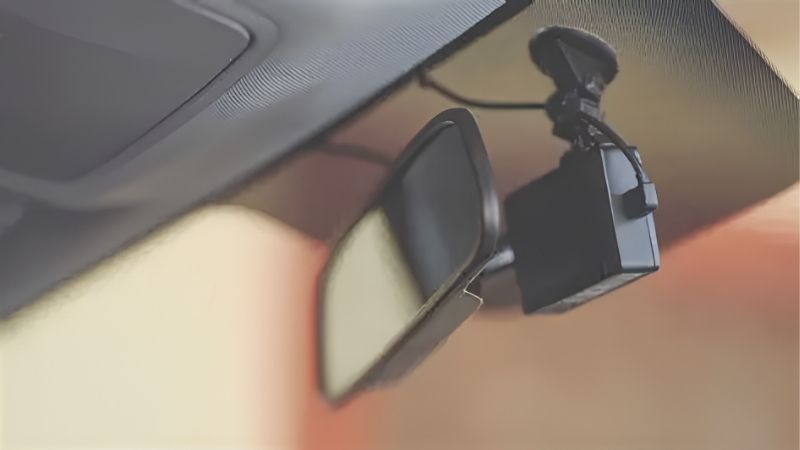
These three are the decisive factors in any best buy dash cam installation. The 12V accessory socket route takes minutes and leaves a visible cable. An OBD adapter is tidier and taps a permanent supply. Hardwiring to the fuse box is the only route that reliably supports parking mode.
Power storage inside the camera matters just as much. Supercapacitor models tolerate a hot parked car far better than lithium battery ones, which swell and fail in summer heat. If parking mode is the goal, a capacitor camera plus a hardwire kit is the combination that lasts.
Cable Routes, Trim and Where Wires Cannot Go
Cable routing is the bulk of the work. A typical run goes from the camera behind the mirror, across the headlining, down the A-pillar, along the door sill trim and into the fuse box footwell. It is mostly tucking rather than cutting, which is why many owners manage it.
The critical rule is that cables must never be routed across a curtain airbag deployment path inside the A-pillar. If your car has side curtain airbags, run the cable around the pillar trim edge rather than behind it, or hand the job to a professional installer.
Fuse Box Access and Voltage Cutoff
The fuse box stage is where most people hesitate, and it is simpler than it looks. A hardwire kit connects to two fuse circuits, one permanently live and one switched with the ignition, plus an earth point. Add-a-circuit fuse taps make this reversible, and a circuit tester identifies which fuse does what in a couple of minutes.
Every kit worth buying includes low-voltage cutoff so the camera shuts down before the car battery is drained. Set it conservatively if the vehicle sits unused for days, and remember that an older battery has less reserve than the default assumes.
When Paying Someone Makes Sense
Modern cars with complex trim, curtain airbags in the pillars, or fuse boxes hidden behind panels are genuinely harder. Leased and warranty-covered vehicles are another case where a professional install avoids arguments later.
Retailers and auto specialists offer fitting as a paid service with their own terms; confirm what is included, whether hardwiring and parking mode are covered and what happens if a fault appears afterwards. Ask before buying the camera, since some services only fit hardware bought in store.
Six Products That Simplify Installation
A best buy dash cam installation usually needs more than the camera box contains, so two cameras chosen for easy fitting are listed here alongside four power accessories that solve specific problems. Each entry lists a genuine drawback.
| Product | Purpose | Install effort | Best for |
|---|---|---|---|
| Viofo A119 Mini 2 | Camera | Low | Discreet single-channel setup |
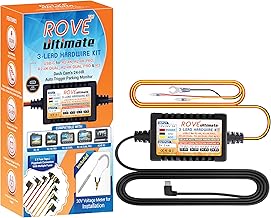
| Vantrue Hardwire Kit | Fuse box power | Medium | Parking mode on a budget |
| Viofo HK4 ACC hardwire kit | Fuse box power | Medium | Adjustable cutoff |
| Garmin Constant Power Cable | Fuse box power | Medium | Garmin owners |
| BlackVue Power Magic Pro | Cutoff controller | Medium | Protecting an older battery |
| Thinkware iVolt Mini | Separate battery pack | Low to medium | Parking mode without fuse taps |
Viofo A119 Mini 2: Small and Simple to Fit
A compact capacitor-powered camera that hides behind the mirror, with a wedge-friendly mount and good low-light footage. Its size is the installation advantage: less obstruction and a shorter cable run to tuck away.
The interface is functional rather than polished, and the companion app trails the mainstream consumer brands. It is a single-channel camera, so a rear-end incident goes unrecorded unless you add a second system.
Vantrue Hardwire Kit: Parking Mode Without Spending Much
Provides the permanent and switched connections a camera needs for parking mode, with low-voltage cutoff to protect the car battery, at a modest price. It includes the fuse taps most installs require.
The cutoff threshold is fixed rather than adjustable on some versions, which is less forgiving with an older battery. Compatibility is model-specific, so confirm the connector matches your camera before ordering.
Viofo HK4 ACC Hardwire Kit: Adjustable Protection
Allows the cutoff voltage and a maximum parking duration to be set, which is the flexibility that matters if the car sits unused for several days at a time. Build quality is solid and instructions are reasonably clear.
It only fits Viofo cameras, so it is not a general-purpose kit. Setting the cutoff too aggressively also means parking mode ends sooner than expected, which some owners misread as a fault.
Garmin Constant Power Cable: Keeping It in the Family
The manufacturer’s own hardwire solution for Garmin cameras, which removes any question of connector compatibility and keeps warranty support straightforward if something goes wrong.
It offers less configuration than third-party kits and costs more than generic equivalents. As with any hardwire route, it still requires fuse box access and a suitable earth point.
BlackVue Power Magic Pro: Cutoff You Can Tune
A separate controller that sits between the fuse box and the camera, offering selectable cutoff voltages and timer limits. For an older vehicle or one used infrequently, that adjustability is worth the extra component.
It adds another box to mount and another connection to make, so the install takes longer. It is also an extra purchase on top of the camera and the wiring itself.
Thinkware iVolt Mini: Parking Power Without Fuse Taps
A separate battery pack that charges while driving and powers the camera when parked, so the car battery is never at risk. For anyone unwilling to touch the fuse box, it removes the main obstacle.
It is bulky and needs somewhere secure to sit, usually under a seat or in the boot, with its own cable run. It is also considerably more expensive than a simple hardwire kit and its cells age like any battery.
Doing It Yourself Without Regretting It
Three points separate a tidy best buy dash cam installation from one that rattles, drains the car battery or has to be undone a month later.
Tools and Time to Budget
Time and tools scale sharply with the route. A socket install takes five minutes and an OBD adapter takes ten. A hardwire install with a rear camera takes one to three hours for a first attempt, plus a trim removal tool set and a circuit tester, both inexpensive.
Work with the ignition off and the key out, identify your fuses before touching anything, and photograph the fuse box first so you can restore it exactly. Rushing this stage is what produces the warning lights people then blame on the camera.
Airbags, Legality and Windscreen Position
Never route cable through an area that a curtain airbag would deploy into. If you cannot confirm the path is clear, take the cable around the outside of the trim or stop and use a fitter.
Placement rules vary by jurisdiction, and some restrict what may obstruct the swept area of the windscreen. Mounting the camera behind the mirror keeps it out of the driver’s sight line and is generally the safest position.
Testing, Cards and Buying Timing
After fitting, verify that the camera powers on with the ignition, records to the card, and enters parking mode when the engine stops. Then check the files play back, since a card that fails silently defeats the whole exercise.
Car electronics and installation accessories are discounted around the Amazon deal event in early October and the Black Friday to Cyber Monday window at the end of November. Buy a high-endurance memory card in the same order, and verify prices at purchase.
Frequently Asked Questions
Three questions come up in nearly every message from readers planning a best buy dash cam installation themselves.
Do I need hardwiring at all?
Only for parking mode. If you simply want recording while driving, the 12V socket or an OBD adapter works perfectly and takes minutes. Hardwiring buys protection while parked, nothing else.
Will hardwiring void my car warranty?
A properly executed install using add-a-circuit fuse taps is reversible and generally uncontroversial, but manufacturers and lease agreements vary. Check your terms first, and consider professional fitting on a vehicle still under warranty.
How do I know which fuse to use?
Use a circuit tester with the ignition on and off to find one permanently live fuse and one switched fuse, avoiding anything safety-critical such as airbags or braking systems. Your owner’s manual lists the fuse map for reference.
See More:
- Best low price dash cam
- Projector screens at Best Buy
- Best buy projector screens
- Best projector for games
- Best projector for gaming
Final Thoughts on Getting a Camera Fitted
A best buy dash cam installation decision is really a decision about parking mode. Without it, plugging into the accessory socket is genuinely enough and takes minutes; with it, you are hardwiring or adding a battery pack.
Confirm what any paid fitting service includes before booking, and buy a hardwire kit with low-voltage cutoff if you do it yourself. Whichever best buy dash cam installation route you take, keep cable clear of curtain airbag paths and verify the recordings afterwards, since an unchecked camera is an untested one.





Write Your Review
No reviews yet. Be the first to share your experience!