
Best projector for games decisions come down to one number most listings bury: input lag in milliseconds. This guide compares seven models on measured latency modes, refresh rate support, ANSI lumens and throw distance, so a big screen does not cost you the response time that competitive play depends on.
As an Amazon Associate we earn from qualifying purchases.
Our top picks


As an Amazon Associate we earn from qualifying purchases at no extra cost to you.
By Daniel Foster
What Actually Matters in a Gaming Projector
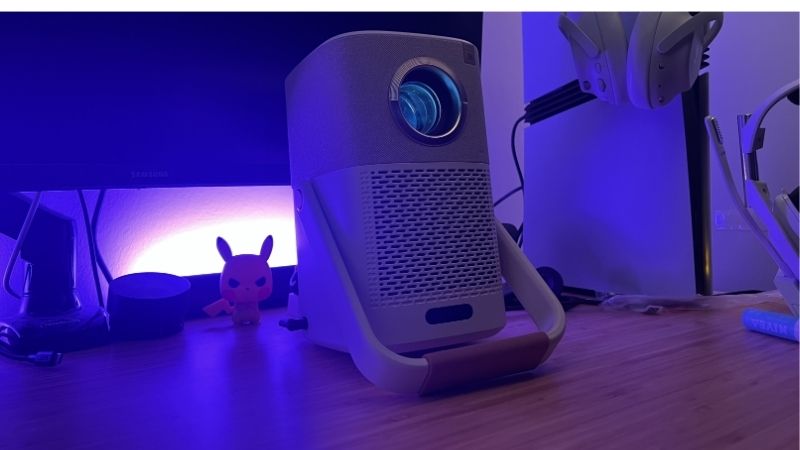
Any best projector for games shortlist splits along one line: projectors marketed for film and projectors built for play diverge on processing. Cinema features such as motion smoothing add latency; gaming modes strip processing to shorten the path from console to screen. Understanding that trade-off is most of the buying decision.
Input Lag, Refresh Rate and Lumens: The Numbers That Decide It
Input lag is the delay between a controller press and the corresponding pixel change. Below roughly 20 milliseconds feels immediate for most players; above 50 the disconnect becomes obvious in shooters and fighting games. Manufacturers usually quote their best case, achieved only in a specific low latency mode.
Refresh rate and resolution trade against each other. A projector may accept 4K at 60Hz with around 16 milliseconds of lag, then drop to 1080p to reach 120Hz or 240Hz with latency in the single digits. Console players on a PlayStation 5 or Xbox Series X should confirm 4K at 120Hz support explicitly.
Brightness is measured in ANSI lumens, and marketing figures that use other units are not comparable. Roughly 2,000 ANSI lumens suits a dimmed room; 3,000 and above is needed where lights stay on. Contrast ratio claims are far less reliable than lumen ratings.
Space and Fit: Throw Distance and Where It Mounts
Throw ratio determines whether the projector fits your room at all. A standard throw model around 1.2 needs roughly 10 feet to fill a 110 inch screen, while a short throw unit near 0.7 achieves similar size from about six feet, which matters enormously in an apartment.
Decide between a ceiling mount and a table placement early. Ceiling mounting keeps the beam clear of players but requires cable runs and a bracket. Table placement is simpler but puts the unit near ears, making fan noise a real factor during quiet moments in a game.
Console or PC: Different Requirements
Console players need HDMI 2.1 features to unlock high frame rate 4K, along with automatic low latency mode so the projector switches profiles without menu diving. Without those, a modern console is capped well below its capability.
PC players often benefit more from high refresh at 1080p, where several projectors reach 240Hz with very low latency. Cable length is a practical concern too, since long HDMI runs at high bandwidth need active or optical cables to stay stable.
Audio routing deserves a decision at the same time. Passing sound through the projector adds a return trip across the cable, so most setups send audio from the console or PC to a receiver or soundbar first and feed video onward, keeping the picture path as short as possible.
Seven Projectors Compared for Gaming
The best projector for games picks below span short throw, standard throw, lamp and laser designs. Each entry names a genuine weakness. Figures are manufacturer specifications combined with pooled owner reports; no measurements were taken by this site.
1. BenQ TK700STi — Short Throw, Console Focused
BenQ built this one around console play: 4K at 60Hz with low latency, 1080p at 120Hz for faster titles, and a short throw lens that reaches a large image from a short distance. The Android TV dongle handles streaming when nobody is playing.
Black levels are ordinary for a lamp-based DLP unit, so film performance trails dedicated cinema projectors. Lamp replacement is also a future cost worth factoring in.
2. Optoma UHD38x — Highest Refresh at 1080p
The UHD38x targets players who value latency above all else, offering very low lag at 1080p with high refresh support and strong brightness for a lit room. For fast shooters on PC it is among the most responsive options available.
Fan noise rises noticeably in the brightest mode, and the aggressive brightness comes with slightly cooler colour out of the box. Expect to spend time in the picture menu.
3. BenQ X3100i — The Gaming-First Flagship
Four LED light source, gaming-specific picture modes and multiple low latency settings make this the most complete gaming projector on the list. Colour accuracy is strong enough that film content does not feel like a compromise.
It occupies the premium end of the category, and its standard throw geometry needs real distance. Small apartments will struggle to place it correctly.
4. ViewSonic PX748-4K — Balanced All-Rounder
A sensible middle option combining 4K resolution, a low latency mode and enough brightness for a family room with some ambient light. Setup tools including keystone and corner adjustment simplify awkward placements.
Digital correction reduces effective resolution, so use it sparingly. Native contrast is average, which shows in dark scenes.
5. Epson Home Cinema 2350 — Colour and Convenience
Epson three-chip LCD design delivers even colour brightness and no rainbow artefacts, which some viewers are sensitive to on DLP units. Built-in Android TV and generous lens shift make placement flexible.
Input lag is higher than the DLP competition here, making it the weaker choice for competitive play. It suits story-driven games and mixed film use better.
6. BenQ TH685P — The Value Entry
For 1080p gaming on a budget, the TH685P offers low latency, solid brightness and a straightforward feature set without smart platform complications. It is the honest entry point into large-screen play.
There is no 4K support and no smart streaming built in, so a console or streaming stick is required. Speakers are functional at best.
7. Xgimi Horizon Ultra — Laser Brightness, Living Room Ready
A hybrid laser and LED light source gives strong brightness with no lamp to replace, plus automatic keystone and focus that make casual placement genuinely easy. For a living room used equally for games and film, it is convenient.
Automatic image processing adds latency compared with dedicated gaming units, and disabling it takes menu work. Competitive players should look elsewhere.
| Model | Resolution focus | Latency profile | Throw | Best for |
|---|---|---|---|---|
| BenQ TK700STi | 4K60 / 1080p120 | Very low | Short | Console in small rooms |
| Optoma UHD38x | 1080p high refresh | Lowest | Standard | Competitive PC play |
| BenQ X3100i | 4K60 / 1080p120 | Very low | Standard | Gaming-first setups |
| ViewSonic PX748-4K | 4K60 | Low | Standard | Mixed family use |
| Epson Home Cinema 2350 | 4K enhanced | Moderate | Standard | Story games and film |
| BenQ TH685P | 1080p | Low | Standard | Entry-level budget |
| Xgimi Horizon Ultra | 4K laser | Moderate | Standard | Living room convenience |
Projector pricing moves frequently across retailers, so check the current figure when you order rather than relying on any published number.
Living With a Gaming Projector
Beyond specifications, daily use raises issues no product page mentions: heat, noise, lamp hours and the awkward reality of a beam crossing the room. These determine whether the setup survives past the novelty phase.
What Wears Out First
Whichever best projector for games you settle on, lamp-based units lose brightness gradually, typically falling noticeably before the rated hour count is reached, and replacement lamps are a recurring cost. Laser and LED light sources avoid this and rate for many thousands of hours.
Fans and filters are the second issue. Dust accumulation raises internal temperature, which increases fan speed and noise, and neglected filters eventually trigger thermal shutdowns. A quarterly clean prevents most of it.
Warranty terms usually split the light source from the chassis, with the lamp or laser module carrying a shorter term than the body. Read those two lines separately, and check whether the maker sells filters and lamps individually, since a unit with no parts supply becomes disposable.
Noise, Heat and Room Practicalities
Brightness and fan noise rise together. In a small room with a table-mounted projector, the highest brightness mode can be audible over game audio during quiet passages, which pushes many owners toward eco modes and better light control instead.
Heat output is real too. A projector running several hours warms a small room measurably, something worth knowing before choosing the best projector for games in a converted bedroom without good ventilation.
Cables, Bundles and Buying Windows
Budget for an HDMI cable rated for the bandwidth you need, especially on ceiling runs beyond about 15 feet where passive cables become unreliable at 4K high refresh. A screen, mount and cable can add substantially to the projector price.
Timing helps. Projectors and home theatre bundles see their strongest promotion during Prime Big Deal Days in early October and again across Black Friday and Cyber Monday at the end of November, when new console bundles also arrive.
Frequently Asked Questions
The questions below come up repeatedly from players choosing their best projector for games and moving from a television to a projected image.
Is a projector fast enough for competitive shooters?
Several DLP models reach latency comparable to a good gaming television when their low latency mode is active. The models to avoid are those with heavy image processing enabled by default, since that adds delay regardless of panel capability.
Do I need 4K at 120Hz?
Only if your console or graphics card can actually deliver it in the titles you play. Many games run at lower frame rates anyway, and a projector with excellent 1080p high refresh performance often feels better than a slower 4K unit.
Can I play with the lights on?
With around 3,000 ANSI lumens and an ambient light rejecting screen, yes, though contrast still suffers. Full darkness remains the best condition, and partial light control delivers most of the benefit for little cost.
Does a projector replace a monitor for PC gaming?
For couch play and controller titles it works well. For desk use, the throw distance, fan noise and text clarity make a monitor the better tool, and many owners keep both rather than choosing one.
See More:
- Best low price dash cam
- Projector screens at Best Buy
- Best buy projector screens
- Best projector for gaming
Final Thoughts on the Best Projector for Games
Choosing the best projector for games means ranking latency, refresh rate support and brightness in the order your play style demands, then checking that the throw ratio suits the room you actually have. Competitive players weight latency; family setups weight brightness and convenience.
Measure the distance from the mounting position to the wall before ordering, confirm the low latency mode specifications for the resolution you intend to use, and plan the cable run in advance. Those three checks prevent nearly every disappointing projector purchase.


Write Your Review
No reviews yet. Be the first to share your experience!