
Best projector for gaming shortlists usually ignore the constraint that eliminates most models: how far the unit can sit from the wall. This guide organises seven options by throw distance and light source, then ranks them on input lag and ANSI lumens, so the projector you choose actually fits the room you play in.
As an Amazon Associate we earn from qualifying purchases.
Our top picks


As an Amazon Associate we earn from qualifying purchases at no extra cost to you.
By Daniel Foster
Room Geometry Comes Before Specifications
The best projector for gaming on paper behaves completely differently depending on where it can be placed. Throw ratio, mounting options and light source all interact with room size, and settling those constraints first narrows the field faster than any specification comparison.
Throw Distance, Lumens and Lag: The Numbers That Decide It
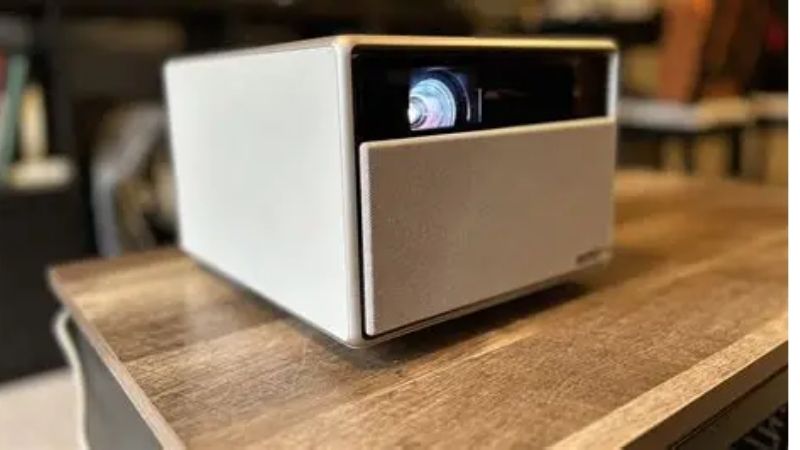
Throw ratio is image distance divided by image width. A unit rated at 1.5 must sit 15 feet back to produce a 10 foot wide picture, while a short throw model at 0.7 achieves the same width from about seven feet. Ultra short throw designs sit under a foot from the wall.
ANSI lumens is the only brightness figure worth comparing, and other units used in marketing cannot be converted reliably. Around 2,000 ANSI lumens works in a darkened room, while 3,000 or more is needed if lights stay on during play.
Input lag completes the set. Gaming modes typically deliver under 20 milliseconds, with the fastest units reaching single digits at 1080p high refresh. Confirm which resolution and refresh combination produces the quoted figure, because the best case rarely applies at maximum resolution.
Space and Fit: Mounting, Clearance and Player Position
Ceiling mounting keeps the beam above heads and frees floor space, but it needs a bracket rated for the weight, a power source and a cable route. Rear shelf placement is simpler and avoids drilling, though players walking past will cast shadows.
Lens shift is the feature that saves awkward rooms. Vertical and horizontal shift moves the image optically without distortion, whereas digital keystone correction crops and rescales the picture, costing resolution exactly where a gamer wants detail. Prefer optical adjustment when the budget allows.
Check vertical offset before buying a mount. Most projectors throw the image above or below the lens centre line by a fixed percentage, which decides how far below the ceiling the bracket must drop. Getting that wrong means either a drop pole or a picture sitting awkwardly high on the wall.
Lamp, LED or Laser: What the Light Source Changes
Lamp projectors are the least expensive to buy and the most expensive to keep, since brightness fades over time and replacement lamps are a recurring purchase. They remain a sensible choice for occasional use.
LED and laser light sources rate for many thousands of hours, start faster and hold brightness far longer. Laser hybrid designs currently offer the best combination of brightness and colour for living room use, at a higher initial outlay.
Start-up behaviour matters more than expected for gaming. Lamp units need a warm-up period and a cooling cycle before they can be moved or switched off cleanly, while LED and laser models reach full output in seconds, which suits short sessions far better than a long ritual does.
Seven Options Grouped by Placement
The best projector for gaming picks below run from short throw units for tight rooms through standard throw models for larger spaces. Each entry names one real drawback. Specifications come from manufacturer documentation and long-term owner reports rather than in-house measurement.
1. Tight Room: BenQ TH671ST
A short throw 1080p projector that fills a large screen from roughly five feet, making it viable in a bedroom or small apartment where nothing can sit far back. Latency is low and setup is uncomplicated.
Resolution stops at 1080p and contrast is modest, so film performance is average. The short throw lens also amplifies any surface imperfection on the wall.
2. Tight Room, 4K: BenQ TK700STi
The 4K short throw option, supporting 4K at 60Hz and 1080p at 120Hz with low latency plus Android TV for streaming between sessions. It is the most practical high-resolution choice for a small room.
Lamp replacement remains a future cost, and black levels trail laser alternatives. Fan noise in bright mode is noticeable at close range.
3. Fastest Response: Optoma UHD38x
Built around latency, this model reaches very low lag at 1080p with high refresh support and delivers strong brightness for rooms that cannot be fully darkened. Competitive PC players are the target.
Colour needs calibration out of the box and the fan is audible at full brightness. It is a tool rather than a refined all-rounder.
4. Gaming-First Premium: BenQ X500i
Four LED light source with dedicated gaming picture modes and multiple latency settings, aimed squarely at players who want a projector designed for the task rather than adapted to it. Colour handling is strong for both games and film.
Standard throw geometry requires genuine distance, and the price sits well above the entry tier. Small rooms should choose a short throw model instead.
5. Bright Rooms: Optoma UHZ50
A laser light source delivers high sustained brightness with no lamp to replace, and gaming modes keep latency competitive. For a living room with windows, it holds an image better than lamp-based rivals.
It is heavy enough to demand a solid ceiling mount, and laser speckle is faintly visible to some viewers on bright uniform scenes.
6. Balanced Family Choice: ViewSonic PX748-4K
Sensible brightness, 4K resolution, a low latency mode and extensive setup adjustment make this a reasonable single projector for a household that plays and watches in equal measure.
Native contrast is average and heavy use of digital keystone reduces sharpness. Use optical placement wherever possible.
7. Portable and Casual: Xgimi Halo Plus
Battery powered with automatic focus and keystone, this one moves between rooms or outdoors for casual play. Setup takes seconds and the built-in speakers are unusually capable for the size.
Brightness and latency both trail mains-powered gaming projectors, so treat it as a convenience device rather than a performance one.
| Model | Throw type | Light source | Latency | Best placement |
|---|---|---|---|---|
| BenQ TH671ST | Short | Lamp | Low | Small bedroom |
| BenQ TK700STi | Short | Lamp | Very low | Apartment living room |
| Optoma UHD38x | Standard | Lamp | Lowest | Desk or ceiling, PC play |
| BenQ X500i | Standard | LED | Very low | Dedicated game room |
| Optoma UHZ50 | Standard | Laser | Low | Bright living room |
| ViewSonic PX748-4K | Standard | Lamp | Low | Mixed family room |
| Xgimi Halo Plus | Standard | LED | Moderate | Portable and outdoor |
Retail pricing in this category changes frequently, so verify the current figure at the moment of purchase.
Ownership Costs and Long-Term Behaviour
Projectors are serviceable devices with consumable parts, and the total cost over five years often differs from the purchase price in ways buyers do not anticipate.
Typical Failure Points
Lamp brightness decay is the most common complaint, appearing as a gradually dimmer image that owners often blame on the screen. Colour wheels in DLP units can develop audible bearing noise, and LCD panels can show gradual colour drift over many thousands of hours.
Dust is the underlying accelerant for most of it. Filters clog, internal temperature rises, fans work harder and component life shortens. Cleaning the filter every few months is the single most effective maintenance habit.
Warranty coverage is worth reading line by line, because the chassis and the light source are almost always covered for different periods, and lamps are frequently excluded or limited by hour count. Availability of replacement filters and lamps years later is the better indicator of long-term value.
Running Costs Nobody Mentions
A replacement lamp represents a meaningful fraction of the projector price and will be needed once or twice across a typical ownership period. Laser and LED models avoid that but cost more initially, which usually evens out over several years of heavy use.
Power consumption is real too. A bright projector draws several hundred watts, more than a comparable television, which matters for households running long sessions. High-bandwidth HDMI cables for ceiling runs are a further one-off cost.
When Prices Move and Why Demand Shifts
Interest in projectors climbs as evenings shorten through October, coinciding with Prime Big Deal Days early in the month, then peaks across Black Friday and Cyber Monday in late November when gift buying and console bundles overlap.
Outdoor and portable models follow the opposite curve, selling through spring and summer for backyard use. Anyone shopping the best projector for gaming outside those windows should expect steadier, less dramatic pricing.
Frequently Asked Questions
These questions come up most often from players planning a first setup and narrowing down the best projector for gaming in their room.
How dark does the room need to be?
Darker is always better, but partial control gets most of the benefit. Closing blinds and switching off lights behind the seating position typically improves perceived contrast more than adding several hundred lumens of brightness.
Wall and ceiling colour matter as much as the lamp. Light-coloured surfaces bounce the beam back into the image and flatten black levels, so a matte dark ceiling and neutral walls do more for the best projector for gaming than an extra brightness tier does.
Is short throw worth the compromise?
In rooms under about twelve feet deep, yes. Short throw lenses show slightly softer corners and less contrast, but a correctly sized image in a real room beats a technically superior projector that cannot fit.
Do built-in speakers matter?
Only as a stopgap. Ceiling-mounted audio arrives from the wrong direction and small drivers lack range, so most owners route sound through a soundbar or receiver within weeks of setup.
Will digital keystone hurt image quality?
Yes, measurably. Keystone correction rescales the image and discards resolution, softening text and fine detail. Adjust physical placement and use optical lens shift where available before reaching for digital correction.
See More:
- Best low price dash cam
- Projector screens at Best Buy
- Best buy projector screens
- Best projector for games
- Best projector for gaming
Final Thoughts on the Best Projector for Gaming
Selecting the best projector for gaming starts with the room: throw distance and mounting options eliminate most of the market before latency and brightness even enter the discussion. Once the geometry is fixed, choose the fastest unit that clears your brightness requirement.
Measure the distance from the intended mounting point to the wall, check the throw calculator for your target diagonal, and plan the cable run before ordering. Those steps take an evening and prevent the most expensive mistake in the category.


Write Your Review
No reviews yet. Be the first to share your experience!