
Ring security camera best buy comparisons usually stop at the hardware price, which hides the number that matters most: recorded video requires a subscription. This guide compares seven models on power type, field of view, mounting requirements and what each one costs to actually run.
As an Amazon Associate we earn from qualifying purchases.
By Daniel Foster
🛒 Best Price Today on Amazon
Prime members get fast, free shipping on everything above, plus member-only deals. New members get a 30-day free trial — cancel anytime.
What Separates the Models in the Lineup
The ring security camera best buy range looks broad but divides cleanly by how a camera gets power and where it mounts. Once those two are settled, the remaining differences are resolution, field of view and lighting.
Power Type, Field of View and Subscription: The Deciding Numbers
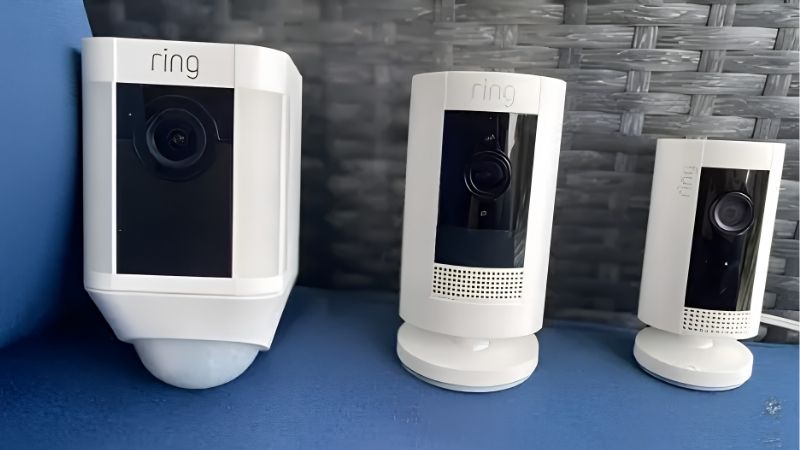
Four things decide a ring security camera best buy shortlist: power source, resolution, horizontal field of view in degrees, and whether recording requires a plan. Battery models are easiest to install; wired models never need charging.
Field of view ranges from roughly 115 to 150 degrees horizontally across the lineup, with resolutions of 1080p on older models and 2K on newer ones. Wider is not always better, since a wide lens spreads pixels across more scene and reduces detail at distance.
Without a subscription, cameras provide live view and notifications but do not store clips. That is the recurring cost to budget for, and it applies across the whole range rather than to specific models.
Space and Fit: Mounting Height, Wiring and Signal
Most cameras in the ring security camera best buy range mount at roughly 7 to 9 ft (2.1 to 2.7 m), angled downward. Higher placement reduces tampering but flattens faces; lower placement captures better detail but is easier to reach.
Wired models need an existing junction box or an outdoor socket, and doorbell models need existing doorbell wiring or a battery. Check Wi-Fi signal at the mounting point before installing, since weak signal is the leading cause of missed and delayed clips.
Battery Life and Charging Reality
Battery models are rated for months per charge, but that assumes light motion traffic. A camera facing a pavement or a driveway can drain in weeks, since every event wakes the radio and records.
Cold weather reduces capacity further. Lithium packs deliver noticeably less in freezing conditions, so a camera that lasts three months in summer may need charging monthly through winter in a cold climate.
Two practical fixes: narrow the motion zones to exclude public areas, and buy a second battery so one charges while the other works. Solar panel accessories help meaningfully in sunny positions but not in shaded ones.
Privacy, Audio and Local Rules
Cameras record audio as well as video, and laws on recording audio, filming neighboring property and notifying visitors vary by country, state and city. Check the rules that apply where you live before installing.
Shared buildings add another layer, since freeholders, landlords and residents associations often set their own rules on exterior cameras in communal areas. Ask before drilling into shared walls or doorframes.
Practically, aim cameras at your own property, use privacy zones to mask areas you do not need, and tell household members and regular visitors that recording is in use. Those steps solve most disputes before they start.
Ring Security Camera Best Buy Picks: Seven Models
The list covers indoor, outdoor and doorbell options. Specifications are manufacturer-stated and combined with recurring themes in long-term owner reports rather than testing carried out by us.
Ring Indoor Cam (2nd Gen)
A small plug-in indoor camera with 1080p video, two-way talk and a manual privacy cover that physically blocks the lens and microphone when you are home.
It needs a socket and has a narrower field of view than outdoor models. The physical shutter is the feature that makes indoor placement palatable for many households.
Ring Stick Up Cam Battery
The flexible workhorse: battery powered, usable indoors or outdoors, mountable on a wall, shelf or ceiling, with 1080p video and two-way talk.
Battery life depends heavily on traffic, and there is no built-in light. Placement flexibility with no wiring is the main reason to choose it.
Ring Stick Up Cam Pro
Adds 3D motion detection with radar, which reduces false alerts from distant movement, plus improved video and a bird’s eye view of the path an object took.
It costs noticeably more than the standard Stick Up Cam and the radar features need a plan to be useful. Fewer nuisance alerts is the practical benefit.
Ring Spotlight Cam Plus
An outdoor camera with built-in LED spotlights and a siren, available in battery, plug-in or solar versions, with 1080p video and coloured night view when the lights trigger.
The spotlights drain a battery faster on a busy frontage. For a driveway or side gate, the light itself is often more of a deterrent than the camera.
Ring Floodlight Cam Wired Pro
The heavy-duty outdoor option, hardwired with bright dual floodlights, a siren, 3D motion detection and audio processing to reduce wind noise.
Installation requires wiring into a junction box, which many owners hire out. Coverage and light output are the strongest in the range.
Ring Battery Doorbell Plus
A doorbell with a tall head-to-toe aspect ratio that shows packages on the doorstep, running on a removable battery so no existing doorbell wiring is needed.
Batteries need recharging every few weeks to months depending on traffic. The vertical field of view is what makes it more useful than older doorbell designs.
Ring Wired Doorbell Pro
Hardwired to existing doorbell wiring, with higher resolution, 3D motion detection with bird’s eye view and no battery to manage.
It requires compatible wiring and a transformer of the right rating, which older homes sometimes lack. Continuous power means no charging routine at all.
| Model | Power | Placement | Light | Main trade-off |
|---|---|---|---|---|
| Indoor Cam (2nd Gen) | Plug-in | Indoor | None | Needs a socket |
| Stick Up Cam Battery | Battery | Indoor or outdoor | None | Battery drains with traffic |
| Stick Up Cam Pro | Battery or wired | Indoor or outdoor | None | Higher price |
| Spotlight Cam Plus | Battery, wired or solar | Outdoor | LED spotlights | Lights drain battery |
| Floodlight Cam Wired Pro | Hardwired | Outdoor | Dual floodlights | Electrical install |
| Battery Doorbell Plus | Battery | Front door | None | Regular recharging |
| Wired Doorbell Pro | Doorbell wiring | Front door | None | Needs compatible wiring |
Hardware prices and bundle contents change frequently on Amazon, and subscription pricing is separate, so check both before deciding.
Running Costs, Reliability and Timing
Anyone comparing a ring security camera best buy listing should weigh the subscription and the network before the hardware, because both determine whether the system works when it matters.
The Subscription Is the Real Cost
Every ring security camera best buy listing hides the same catch: live view and alerts work without a plan, while recorded clips, history and most advanced detection features do not. Over three years, plan costs typically exceed what you paid for a single camera.
Multi-camera plans cost less per device than individual ones, so households planning several cameras should price the whole system rather than one unit. Compare that total against alternatives with local storage if ongoing fees are a concern.
Network and Reliability
Most missed events trace to Wi-Fi rather than the camera. Check signal strength at the mounting point, and consider a mesh node or access point nearer the door rather than blaming the device.
Motion zones and sensitivity need tuning in the first week. A camera left on default settings in a busy street position generates so many alerts that people stop reading them, which defeats the purpose entirely.
Buying Timing
Smart home security is heavily promoted in the fourth quarter and around Prime events. Amazon runs Prime Big Deal Days in early October, with Black Friday and Cyber Monday in late November as the deepest window.
Bundles pairing a doorbell with an indoor camera or a chime are common then. Specific discounts vary by model and cannot be promised in advance.
Frequently Asked Questions
Questions people ask before committing to a camera system.
Do these cameras work without a subscription?
They provide live view and motion notifications, but clips are not stored and history is unavailable. If recorded footage matters to you, budget for a plan.
Battery or wired?
Battery models install anywhere in minutes; wired models never need charging and support continuous features. Busy frontages favor wired power.
Can I point a camera at the street?
Rules vary by jurisdiction, and some places restrict recording public areas or neighboring property. Use privacy zones and check local law before installing.
How long do batteries last?
Manufacturer figures assume light traffic. In practice, expect weeks in busy positions and months in quiet ones, which is why a spare battery is a sensible purchase.
See More:
- Best low price dash cam
- Projector screens at Best Buy
- Best buy projector screens
- Best projector for games
- Best projector for gaming
Choosing the Right Camera
A sensible ring security camera best buy decision starts with power and placement rather than resolution. Front doors point to the Battery Doorbell Plus or Wired Doorbell Pro; driveways and gates to the Spotlight Cam Plus or Floodlight Cam Wired Pro.
Indoors, the Indoor Cam with its physical shutter is the practical choice. Price the subscription across three years, check Wi-Fi at the mount point, tune motion zones in the first week, and confirm local rules before pointing anything beyond your own property.
Our top picks
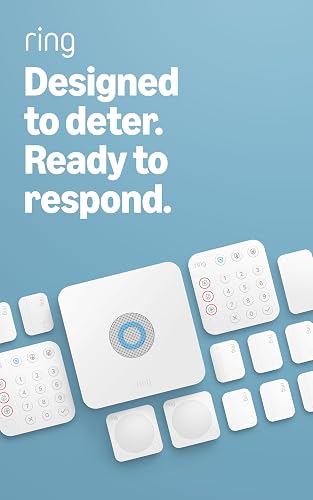 Ring Alarm 14-Piece Kit
14-piece kit covers 2 to 4 bedroom homes out of the box
Expandable with additional sensors as needs grow
Mobile app sends notifications when the system triggers
24/7 professional monitoring requires a separate Ring Protect subscription
Alexa voice control also needs a Ring Protect subscription
 Ring Indoor Cam
Color Night Vision keeps footage clear after dark
Manual privacy cover physically blocks the camera and mic
Flexible swivel mount adapts to tabletop or high placement
Plug-in design needs a nearby power outlet
Advanced features like rewatching footage need a separate Ring Protect subscription


 Ring Alarm 8-Piece Kit
- Compatible Devices: Smartphone
- Control Method: Voice
- Battery Cell Composition: Lithium Ion
8-piece kit fits most 1 to 2 bedroom homes
Keypad lets you arm and disarm without a phone
Expandable with additional sensors as needs grow
Remote arming and 24/7 monitoring need a Ring Protect subscription
Alexa voice control also requires that subscription


As an Amazon Associate we earn from qualifying purchases at no extra cost to you.





Write Your Review
No reviews yet. Be the first to share your experience!