
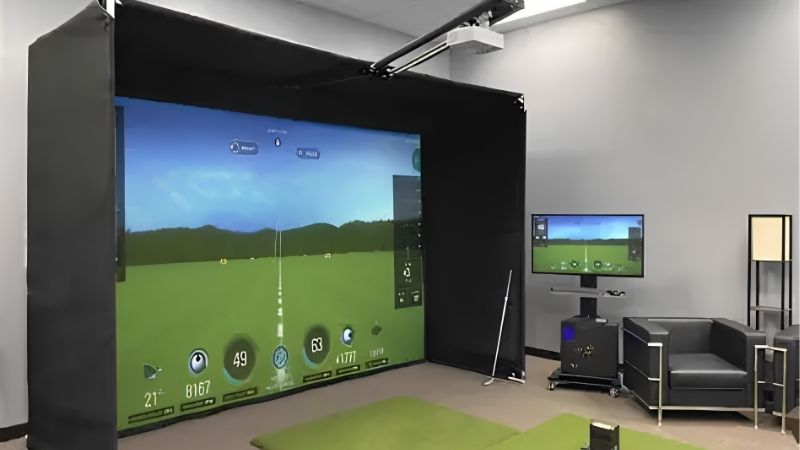
Best projector for golf sim selection is a geometry problem before it is a picture quality problem. Throw ratio decides whether you can mount the unit clear of the swing path, and everything else follows. This guide compares seven short throw models on throw, brightness, resolution and mounting.
As an Amazon Associate we earn from qualifying purchases.
By Daniel Foster
🛒 Best Price Today on Amazon
Prime members get fast, free shipping on everything above, plus member-only deals. New members get a 30-day free trial — cancel anytime.
Geometry First, Picture Quality Second
The best projector for golf sim use must fill the impact screen from a position that avoids both the swing arc and the player’s shadow. A brilliant projector in the wrong place is unusable, so the numbers below come in a specific order.
Throw Ratio, Brightness and Resolution: The Deciding Numbers
Three specifications decide the best projector for golf sim shortlist: throw ratio, brightness in ANSI lumens, and native resolution. Short throw units sit around 0.5 to 0.8:1, meaning a 10 ft (3 m) wide image needs roughly 5 to 8 ft (1.5 to 2.4 m) of distance.
Brightness of 3,000 to 4,000 ANSI lumens suits a room with controlled light, while bright garages or rooms with windows benefit from 4,000 or more. Impact screen material also absorbs light, so budget headroom rather than matching the minimum.
Resolution follows from screen width. On a 10 to 12 ft (3 to 3.7 m) impact screen viewed from a few feet away, 1080p is visibly softer than 4K, though many sim users prioritize brightness and throw over pixel count.
Space and Fit: Ceiling Height, Swing Arc and Mount Position
Measure ceiling height before choosing a best projector for golf sim mount. Most bays need 9 to 10 ft (2.7 to 3 m) minimum for a full swing, and the projector must sit above that arc, typically ceiling mounted 8 to 12 ft (2.4 to 3.7 m) back from the screen depending on throw ratio.
Check side clearance for the mount and cabling, and confirm the lens offset. Ceiling-mounted projectors need a vertical offset that places the image on the screen without heavy keystone correction, which softens the image noticeably.
Input Lag and Why It Matters Less Here
Sim software renders ball flight after impact rather than requiring frame-accurate input, so input lag matters far less on a best projector for golf sim than it would in gaming. Figures below 50 ms are more than adequate for any launch monitor setup.
That frees the budget to go toward brightness and throw ratio instead. Chasing a single-digit lag figure at the expense of lumens is one of the more common mistakes in first-time bay builds.
What does matter is refresh consistency and the projector’s handling of fast motion, since ball flight animations look poor with heavy frame interpolation. Turning off motion smoothing is usually the first setup step.
Light Source, Running Cost and Noise
Lamp projectors are cheaper upfront with lamps rated at 4,000 to 15,000 hours depending on mode, plus replacement cost every few years. Laser models cost more but are rated for 20,000 to 30,000 hours with no consumables.
Run the projector in eco mode where brightness allows. It extends lamp or laser life, lowers fan noise and often improves black levels, at a cost in peak output that a light-controlled bay rarely misses.
Fan noise runs roughly 28 to 35 dB, which matters in an enclosed bay with hard surfaces. Ceiling mounting puts the fan above head height, which helps more than a few decibels on paper suggests.
Best Projector for Golf Sim Picks: Seven Short Throw Models
Every model here has a throw ratio suitable for a bay. Specifications are manufacturer-stated and combined with recurring themes in owner reports rather than testing performed by us.
BenQ LK936ST
A 4K laser short throw model with high brightness, a throw ratio around 0.81:1 and a golf-specific mode, designed for permanent commercial-style installations.
It is the most expensive option here by a wide margin. Laser life and brightness make it the choice for a bay used daily or commercially.
BenQ TH671ST
A 1080p lamp projector with a throw ratio near 0.69:1 and roughly 3,000 ANSI lumens, long established as the budget standard for home sim builds.
Resolution limits sharpness on a wide screen and lamps need replacing periodically. Cost to get a bay running is its main advantage.
BenQ TH685P
A 1080p projector with around 3,500 ANSI lumens and HDR support, at a slightly longer throw than the TH671ST, suiting deeper rooms.
The longer throw requires more distance behind the hitting area. Brightness for the price is strong.
Optoma GT2160HDR
A short throw 1080p model with around 4,000 ANSI lumens and a throw ratio near 0.5:1, allowing a large image from a very short distance.
Fan noise is higher than average in bright modes. The extremely short throw solves low-ceiling and shallow-room installations that others cannot.
Optoma UHZ35ST
A 4K UHD laser short throw with roughly 3,500 ANSI lumens and a long-life light source, aimed at buyers who want laser reliability without commercial pricing.
It sits well above lamp models in price. No lamp replacement over the life of the bay offsets some of that.
ViewSonic PX748-4K
A 4K projector with around 4,000 ANSI lumens and a shorter throw than typical home theatre units, with low input lag modes included.
It is not as short throw as the Optoma GT series, so room depth needs checking. Resolution and brightness together at this price are competitive.
Epson Home Cinema 2350
A 1080p three-chip LCD projector with strong colour brightness and built-in streaming, usable in a sim bay with adequate room depth.
The throw ratio is longer than dedicated short throw models, requiring a deeper room or a rear mount. Colour output is its strength.
| Model | Resolution | Brightness | Throw ratio | Main trade-off |
|---|---|---|---|---|
| BenQ LK936ST | 4K laser | ~5,100 lumens | ~0.81:1 | Highest price |
| BenQ TH671ST | 1080p lamp | ~3,000 lumens | ~0.69:1 | Soft on wide screens |
| BenQ TH685P | 1080p lamp | ~3,500 lumens | Longer throw | Needs more depth |
| Optoma GT2160HDR | 1080p lamp | ~4,000 lumens | ~0.5:1 | Fan noise |
| Optoma UHZ35ST | 4K laser | ~3,500 lumens | Short throw | Price above lamp models |
| ViewSonic PX748-4K | 4K lamp | ~4,000 lumens | Moderate | Not true short throw |
| Epson Home Cinema 2350 | 1080p 3LCD | ~2,800 lumens | Standard throw | Needs a deep room |
Prices and available generations change often on Amazon, so confirm the exact model number and throw specification against your bay measurements before ordering.
Installation, Calibration and Timing
Choosing the best projector for golf sim is half the work; mounting it correctly is what determines whether the image is sharp and shadow-free.
Mounting Without Keystone
Aim to mount so the lens offset places the image correctly with no keystone correction at all. Digital keystone scales the image and visibly softens detail, which is most obvious on ball flight and text overlays.
Use a mount with fine tilt and roll adjustment, and centre the projector horizontally on the screen. A projector mounted off-centre requires horizontal correction, which costs more sharpness than vertical correction does.
Avoiding Shadows and Glare
Position the unit far enough back that the player’s head and club never break the light path at address or at the top of the backswing. Ceiling mounts sit best slightly behind the hitting position rather than directly above it.
Matte impact screens reduce hot-spotting, and painting the surrounding walls a dark neutral colour improves perceived contrast more than any picture setting. Ambient light control matters more than raw lumens.
Buying Timing
Projectors are promoted heavily in the fourth quarter and around sporting seasons. Amazon runs Prime Big Deal Days in early October, with Black Friday and Cyber Monday in late November as the deeper window for home theatre gear.
Previous-generation models drop most once a successor ships, and differences are frequently incremental. Discounts vary by model and cannot be promised in advance.
Frequently Asked Questions
Questions from people planning a sim bay.
How many lumens do I need?
Around 3,000 ANSI lumens for a light-controlled room and 4,000 or more for a garage or a space with windows. Impact screens absorb light, so allow headroom.
Is 4K worth it over 1080p?
On a screen 10 ft wide viewed from a few feet away, yes, the difference is visible. Many builders still prioritise brightness and throw ratio when budget forces a choice.
Ceiling mount or floor position?
Ceiling mounting is standard because it keeps the unit clear of the swing and reduces shadows. Floor placement risks club contact and is generally avoided.
Does input lag matter for golf sims?
Far less than for gaming, since ball flight is rendered after impact. Anything under 50 ms is comfortably adequate.
See More:
- Best low price dash cam
- Projector screens at Best Buy
- Best buy projector screens
- Best projector for games
- Best projector for gaming
Matching a Projector to Your Bay
The best projector for golf sim is the one whose throw ratio fits your room before anything else. Measure ceiling height, screen width and available depth, then shortlist only models that produce that image size from that distance.
Tight rooms point to the Optoma GT2160HDR, budget builds to the BenQ TH671ST, and permanent installations to the BenQ LK936ST or Optoma UHZ35ST for laser life. Mount without keystone, control ambient light, and turn off motion smoothing on day one.
Our top picks


![[4500 Brightness/Built in Apps/65W Audio] Outdoor 4K-Projector with WiFi and Bluetooth 5.4, Auto Focus Smart Projector Support DoIby Audio, Upgrade GO2 Short Throw Projector with 360°Stand](https://m.media-amazon.com/images/I/61uCEIeZRxL._AC_UL320_.jpg)
![Smart Projector 4K [VIDAA Live TV & 36W Dolby & Voice Control] with WiFi6 and Bluetooth, Short Throw Projector Compatible with Netflix, AI Auto Focus, HDR10, Home Theater Proyector for Outdoor Movies](https://m.media-amazon.com/images/I/816Shs0uwRL._AC_UL320_.jpg)
![[100% Offset & Short Throw] 4K Support Projector with WiFi 6 and Bluetooth 5.2, Antmap Outdoor Movie Projector with 12W Immersive Speaker, Home Theater Proyector Compatible with Phone/TV Stick/PC/PS5](https://m.media-amazon.com/images/I/71EFirxAauL._AC_UL320_.jpg)


As an Amazon Associate we earn from qualifying purchases at no extra cost to you.

Write Your Review
No reviews yet. Be the first to share your experience!