
Best cellular security camera decisions turn on a recurring cost most listings mention only in small print: the data plan. A camera with no wifi needs its own connection, and this guide compares seven models on plan structure, resolution, power source, storage and the signal each one actually requires.
As an Amazon Associate we earn from qualifying purchases.
Our top picks


As an Amazon Associate we earn from qualifying purchases at no extra cost to you.
By Daniel Foster
Why These Cameras Exist and What They Cost
A best cellular security camera solves one problem, namely monitoring somewhere with no broadband. Barns, building sites, holiday cabins, boat yards and remote gates all fall into that category, and the trade for that freedom is a monthly subscription that never ends.

Data Plan, Resolution and Power Source: The Numbers That Decide It
Plan structure is the first thing to read. Some cameras bill by image or clip count per month, others by data volume in gigabytes, and a few bundle unlimited viewing with limited cloud retention. Higher resolution consumes the allowance faster, which links the two specifications directly.
Resolution ranges from 1080p to 4K across this category, but bandwidth matters more than pixel count. A 4K camera on a weak signal buffers, drops clips or falls back automatically, so the practical resolution is whatever the connection sustains rather than what the box claims.
Power source determines where it can go. Battery-only units need recharging every few weeks depending on activity, solar panels extend that indefinitely in a sunny position, and mains power removes the issue entirely where a supply exists.
Space and Fit: Mounting, Signal and Line of Sight
Check cellular coverage at the exact mounting point before buying, not at the house. A camera on the far side of a barn or below a ridge line can sit in a dead spot while the yard has three bars, and no setting compensates for absent signal.
Solar panels need a genuinely unobstructed southern aspect in the northern hemisphere and regular cleaning. A panel shaded for half the day through winter will not keep pace with an active camera, and the unit quietly stops reporting.
Storage, Retention and What Happens Offline
Local storage on a microSD card keeps recording when the network drops, which matters in the exact conditions these cameras are bought for. Cloud-only models lose everything during an outage.
Card choice matters more than capacity. Continuous recording rewrites the same cells repeatedly and outdoor housings reach high temperatures in summer, so a high-endurance card rated for video is the sensible specification rather than the largest one available.
Check retention length and whether it depends on the subscription tier. A plan offering seven days of history means footage from a fortnight ago is gone, which is a genuine limitation when discovering damage or theft after the fact.
Seven Cameras Compared
The best cellular security camera options below span property monitoring units and rugged trail-style models. Each entry names a genuine drawback. Figures reflect manufacturer specifications and pooled long-term owner reports rather than testing conducted here.
1. Reolink Go PT Ultra — High Resolution With Local Storage
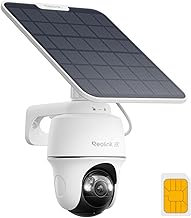
A 4K pan and tilt camera running on battery with an optional solar panel, recording to a microSD card as well as the cloud. Local storage means footage survives a network outage, which is unusual in this category.
4K consumes data quickly, so the plan tier matters, and pan and tilt movement drains the battery faster than a fixed camera. It needs a reasonable signal to stream smoothly.
2. Reolink Go Plus — The Balanced Choice
A fixed 2K camera with battery and solar options and microSD recording, offering longer battery life than the pan and tilt version and lower data consumption at the same activity level.
No pan or tilt means the field of view is fixed at installation, so mounting position becomes critical. Night range is adequate rather than exceptional.
3. Arlo Go 2 — Falls Back to Wifi
Works on cellular or wifi and switches between them, which suits a property that has connectivity sometimes, such as a cabin with intermittent service or a site during construction.
The subscription is required for most useful features and stacks up over years. Battery life shortens considerably in high-activity locations.
4. Eufy 4G LTE Starlight S330 — Strong Night Performance
Colour night vision through a large sensor, solar charging and local storage, aimed at properties where identifying detail after dark matters rather than simply detecting movement.
It is one of the more expensive options and the solar panel needs a genuinely good aspect. Setup is more involved than consumer wifi cameras.
5. Vosker V300 — Rugged Property Monitoring
Built for outdoor sites with a weatherproof housing, solar charging and a plan structure aimed at property surveillance rather than trail photography. Durable in exposed positions.
Image quality trails the consumer options and the interface is functional rather than polished. Plan costs sit at the higher end.
6. Tactacam Reveal X Gen 2.0 — Lowest Running Cost
A trail-camera format with a very inexpensive data plan billed by image count, which suits a gate, a fence line or a remote outbuilding that needs occasional stills rather than live video.
It captures images and short clips rather than continuous video, and live viewing is limited. This is a monitoring tool, not a security system.
7. Spypoint Link-Micro-S LTE — Compact and Solar
Small, solar powered and cheap to run, sending images on detection. For unattended land or a distant shed where any information beats none, the value is difficult to match.
Resolution and night range are modest, and detection is passive infrared so it misses distant movement. Cloud plans limit image counts on lower tiers.
| Model | Resolution | Power | Local storage | Plan style |
|---|---|---|---|---|
| Reolink Go PT Ultra | 4K | Battery or solar | microSD | Data volume |
| Reolink Go Plus | 2K | Battery or solar | microSD | Data volume |
| Arlo Go 2 | 1080p | Battery | microSD | Subscription tiers |
| Eufy 4G Starlight S330 | 2K | Solar | microSD | Data volume |
| Vosker V300 | 1080p | Solar | microSD | Subscription tiers |
| Tactacam Reveal X Gen 2.0 | Images and clips | Batteries or solar | microSD | Image count |
| Spypoint Link-Micro-S | Images | Solar | microSD | Image count |
Plan pricing and model availability change frequently, so verify both at the moment of purchase rather than relying on published figures.
Subscriptions, Weather and Long-Term Ownership
On any best cellular security camera, the purchase price is the smallest part of the decision over five years. Plan costs, battery replacement and weather exposure all accumulate, and one of them is easy to underestimate.
The Subscription Is the Real Cost
A modest monthly plan across five years frequently exceeds the camera price several times over, and multiple cameras multiply that directly. Price the plan for the number of units you intend to install before choosing a brand.
Check what the camera does with no subscription at all. Some units retain local recording and local viewing, while others become inert without an active plan, which is a substantial difference in what you actually own.
Weather, Batteries and What Fails
Cold weather reduces battery capacity sharply, so a unit lasting a month in September may need recharging fortnightly in January. Solar output falls at the same time, which compounds the problem in northern latitudes.
Beyond batteries, seal degradation around the housing and microSD card failure from temperature extremes are the common faults. Check the ingress protection rating against the exposure at your mounting point.
Warranty terms usually cover the camera body for a year while treating batteries, panels and mounting hardware separately. Confirm that replacement batteries and solar panels remain available for the model, since a sealed unit with no spares becomes disposable when one part fails.
Legal Notes and Buying Windows
Recording rules vary by jurisdiction, particularly regarding audio capture and cameras overlooking neighbouring property or public rights of way. Check local requirements before installing rather than afterwards.
On timing, security hardware sees promotion during Prime Big Deal Days in early October and across Black Friday and Cyber Monday at the end of November, which also coincides with the season when parcel theft and darker evenings raise interest.
Frequently Asked Questions
These questions come up most often from readers choosing the best cellular security camera for a property without broadband.
Do I need a separate SIM contract?
Most best cellular security camera makers supply a SIM tied to their own plan, which simplifies setup but locks you to their pricing. A few accept third-party SIMs, which can lower cost but adds configuration work.
How much data does one camera use?
A best cellular security camera uses data according to activity and resolution. A quiet gate sending a few clips daily uses very little, while a busy driveway streaming 4K can exhaust a mid-tier allowance within days. Start conservative and adjust.
Will it work with poor signal?
Marginal coverage produces delayed uploads, failed clips and short battery life as the radio works harder. Test signal at the exact mounting point, and consider an external antenna where the camera supports one.
Is solar enough through winter?
Only with an unobstructed aspect and regular cleaning. In northern latitudes with short days, many owners supplement with periodic manual charging or accept reduced activity settings during the darkest months.
See More:
- Best low price dash cam
- Projector screens at Best Buy
- Best buy projector screens
- Best projector for games
- Best projector for gaming
Final Thoughts on Going Cellular
The best cellular security camera for a site is the one whose plan structure matches your actual activity level, with local storage so an outage does not erase the footage you installed it for. Signal at the mounting point outranks every other specification.
Test coverage where the camera will sit, price the subscription across five years and the number of units you need, and check what the device still does without an active plan. Then confirm local rules on recording before mounting anything.




Write Your Review
No reviews yet. Be the first to share your experience!